Introduction
Running a busy restaurant involves managing dozens of moving parts at the same time. While kitchen teams focus on food quality and timing, the front-of-house staff handles guest arrivals, phone calls, seating arrangements, and table turnover. When reservations arrive through phone calls, paper logs, and digital channels all at once, service can quickly become chaotic.
For independent operators and growing hospitality teams, keeping track of bookings manually often leads to missed requests, double bookings, or miscommunication during peak hours. Using Restaurant Reservation Software helps teams organize incoming guest details, review upcoming arrivals, and plan seating layouts before the dining room fills up. By introducing structured digital workflows, restaurants can reduce friction at the host stand and create a smoother experience for both diners and staff.
Understanding the Booking Journey
The dining experience begins long before a guest steps through the front door. It usually starts when a visitor finds the restaurant online, checks available dates, and requests a table. Managing this initial request efficiently sets the tone for the entire visit.
When a guest requests a table through an Online Restaurant Booking System, the platform records the party size, preferred time, and contact details automatically. This prevents manual note-taking errors and ensures that staff members do not miss vital dietary or special occasion notes. Once a booking is confirmed, automated messages can remind guests of their reservation, reducing the likelihood of unexpected no-shows.
When the guest arrives, the front-of-house team updates their status from pending to seated, which immediately reflects on table availability displays. If a party needs to modify or cancel their booking, having a centralized digital record allows staff to adjust table schedules instantly without disrupting service.
Matching Table Layouts With Real Booking Capacity
Accepting reservations is only part of the daily challenge; the bigger task is fitting those parties into the physical dining room. Without a clear view of physical tables and seating capacity, restaurants risk overbooking certain sections while leaving other areas empty.
Using Restaurant Table Management Software helps teams monitor table status, track seating capacity, and prevent conflicting allocations. For example, if a table seats four, the system prevents a party of six from being assigned to it unless suitable tables are combined.
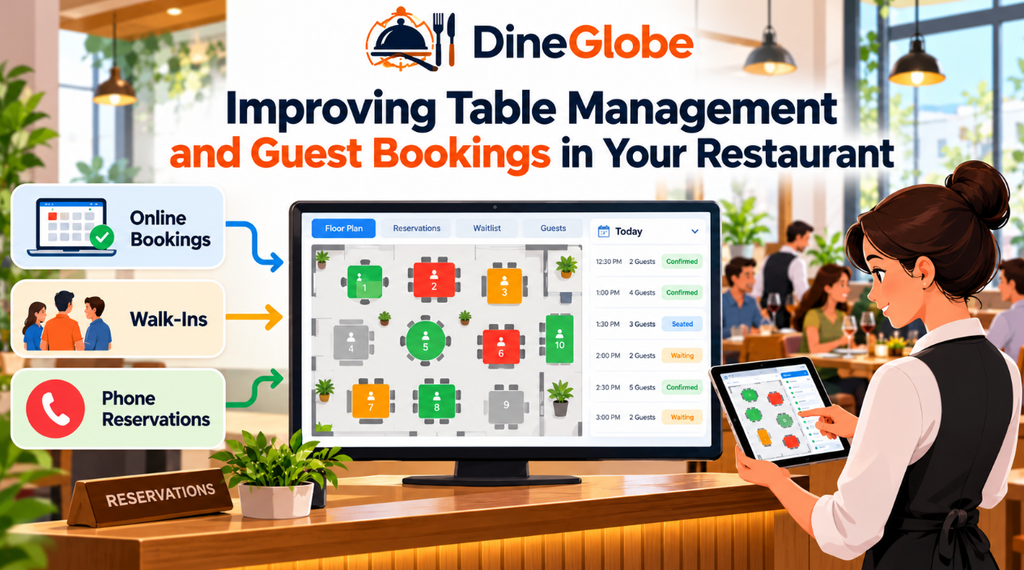
Furthermore, operators can configure seating buffers between bookings. These small timing gaps give staff enough time to clear, sanitize, and reset tables properly. When a dining room utilizes Restaurant Floor Plan Software, hosts can visually represent their physical layouts and understand how available tables relate to confirmed bookings in real time. This visual clarity helps teams seat arriving guests quickly without guessing which tables are free.
Managing Demand During Busy Service Periods
Even with careful planning, busy weekend shifts inevitably bring more guests than available tables. When every seat is occupied, managing arriving walk-ins and waiting diners requires clear communication and accurate timing estimates.
Implementing Restaurant Waitlist Management Software allows host staff to record guest names, phone numbers, and party sizes when the dining room is full. Instead of relying on guesswork, hosts can provide more realistic waiting-time estimates based on current table turnover rates. As tables are cleared and reset, the system updates remaining wait times automatically.
When managing unreserved guests, Restaurant Walk-In Management Software helps teams log walk-in arrivals alongside pre-booked parties. This ensures that walk-in guests are accounted for fairly and seated as soon as an appropriate table opens up. However, estimated wait times should always be treated as approximations, as actual dining durations can vary depending on party size and course selections.
Helping Hosts Coordinate Service
The front-of-house host stand is the central hub of any restaurant. During peak hours, hosts juggle phone inquiries, greet incoming guests, manage waitlists, and guide diners to their tables.
Equipping the team with reliable Restaurant Host Stand Software provides a centralized view of all daily activities. Hosts can quickly review upcoming reservations, expected arrivals, currently seated parties, and open tables on a single screen. This digital overview reduces the need for shouted communication across the room and helps staff prepare for large groups or VIP arrivals in advance.
While technology streamlines organization, it does not replace human judgment. Experienced hosts still rely on intuition and personal interaction to welcome guests warmly and handle special requests with care.
Supporting Independent and Smaller Restaurants
Independent restaurants often operate with lean teams and tight profit margins. For smaller venues, investing in overly complex technology can create unnecessary training burdens and administrative overhead.
Selecting the right Restaurant Reservation Software for Small Restaurants means looking for intuitive interfaces that staff can learn in minutes. Small restaurants benefit from tools that focus on core operational needs—such as quick table assignments, simple booking calendars, and straightforward guest communication—without paying for advanced features they rarely use. Clear booking policies, straightforward cancellation rules, and simple daily workflows help smaller teams maintain control over their dining rooms without adding extra administrative work.
Building Direct Guest Relationships
Many restaurants rely heavily on third-party dining marketplaces to attract new visitors. While external platforms can help increase initial discovery, they often position themselves between the restaurant and its guests, keeping valuable customer data out of the operator’s hands.
Adopting a Direct Restaurant Booking System gives dining venues a way to accept reservations directly through their own website or social media channels. This approach allows restaurants to retain full control over their booking policies, maintain consistent branding, and communicate directly with guests before their visit. Direct booking channels also make it easier to collect appropriate guest feedback and build long-term relationships with regular diners.
Exploring Pilot Programs and Free Options
For restaurant owners hesitant to commit to monthly subscription fees, exploring introductory software options is a common first step.
Evaluating a Free Restaurant Reservation System or participating in an early-stage pilot program allows operators to test digital booking workflows without immediate financial risk. However, before adopting any free or pilot tool, owners should carefully review potential limitations. It is important to check whether there are restrictions on monthly bookings, staff accounts, table layout customization, or customer support availability. Understanding these terms ensures that the chosen software can scale as the restaurant grows.
Practical Implementation Steps for Your Restaurant
Transitioning from traditional booking methods to digital operations requires careful planning and team collaboration. The following checklist can help guide the implementation process:
- Map Your Current Workflow: Review how your team currently records phone bookings, walk-ins, and cancellations.
- Record Table Layouts: Measure your dining room layout and document all table sizes, combinations, and seating capacities.
- Define Booking Rules: Establish clear rules regarding maximum party sizes, reservation durations, and turnaround times.
- Set Clear Policies: Communicate cancellation and late-arrival policies clearly to guests during the booking process.
- Train Your Team: Conduct training sessions with hosts and managers so everyone feels comfortable updating table statuses in real time.
- Test Common Scenarios: Simulate busy service scenarios to ensure your team knows how to handle walk-ins and waitlists efficiently.
- Review and Refine: Analyze operational reports regularly to identify bottlenecks and improve table turnover rates over time.
Exploring Solutions Like DineGlobe
As restaurants look for ways to streamline their front-of-house workflows, platforms like DineGlobe.com offer dedicated tools designed to simplify online bookings, table allocation, and guest communication. By providing a structured space for managing direct reservations, physical floor plans, and daily waitlists, such platforms aim to reduce the administrative burden on host staff.
Operators exploring new tools should assess whether a platform’s specific features—such as multilingual support, role-based staff permissions, or pilot-program access—align with their daily operational requirements.
Frequently Asked Questions
What is the main benefit of using a digital booking system? A digital booking system helps restaurants organize incoming reservations, reduce double bookings, track table availability in real time, and communicate more effectively with guests before their arrival.
How does table management software prevent double booking? Table management software tracks reserved times and party sizes against available dining room capacity. When a time slot is booked, the system automatically blocks out that capacity to prevent overlapping reservations.
Can small independent restaurants benefit from reservation software? Yes. Smaller venues benefit from simplified scheduling, reduced phone interruptions during service, and automated reminder messages that help minimize unexpected no-shows.
How do waitlist tools handle walk-in guests? Waitlist tools allow staff to record walk-in party details and contact numbers when tables are full. The software estimates waiting times based on current table turnover and notifies guests when their table is ready.
What is the difference between direct bookings and marketplace bookings? Direct bookings happen through the restaurant’s own channels, giving the business control over guest data and booking policies. Marketplace bookings occur through third-party dining platforms, which often handle discovery but may interpose between the restaurant and the diner.
Are there free restaurant reservation systems available? Some platforms offer introductory versions, basic tiers, or pilot programs with limited features. Restaurants should verify feature limits, booking caps, and support terms before relying on a free tool for daily service.
Do reservation systems replace front-of-house staff? No. Reservation and host stand software are designed to assist staff by organizing information and tracking table status, but human judgment remains essential for welcoming guests and managing service flow.
What should I check before choosing a restaurant software provider? Operators should evaluate ease of use, staff training requirements, table layout customization, reporting tools, customer support availability, and overall cost relative to the restaurant’s operating model.
Conclusion
Managing front-of-house operations requires a careful balance of organization, timing, and hospitality. Whether handling phone reservations, arranging physical floor plans, or coordinating walk-in waitlists, having a clear view of daily availability helps service run smoothly.
By selecting tools that match their specific workflow and team size, independent restaurants can reduce service friction and focus on delivering memorable dining experiences. Exploring options like DineGlobe provides a practical way for operators to evaluate modern digital booking solutions and support their daily front-of-house needs.